Learn how to transform raw git logs into readable engineering reports. Explore tools for founders and PMs to track progress without reading code.
Read ← Blog
Guide · · 14 min read
Release Notes Document Template: 7 Examples for Every Stakeholder
Stop manual git log digging. Use these release notes document templates to translate technical commits into clear, stakeholder-ready status reports.
DevSummary Team
Audit your current release documentation against the specific information needs of your non-technical stakeholders. Complete this step before you select a template. A raw list of GitHub commits serves a developer’s workflow, but it fails to inform a founder, a sales lead, or an end-user about the actual value delivered. Identify the primary audience for each update before you write it. This eliminates the need for manual follow-up meetings where team members struggle to translate technical jargon into business impact.
Adopt a release notes template to automate the process of sharing updates across departments once coding is finished. You will be able to decide exactly which technical details belong in a public-facing patch note and which migration paths must be highlighted for downstream developers. This guide establishes how to structure your updates, including AI-generated engineering summaries and local-first privacy workflows. This method ensures that every stakeholder receives actionable data without compromising the security of your source code in 2026.
Key takeaways
- Prioritize user-facing impact over technical implementation details to ensure non-technical stakeholders actually read the notes.
- Automate the extraction of ‘why’ from git commits using AI to bridge the gap between raw code changes and business value.
- Segment release notes by audience: founders need high-level outcomes, while developers need specific breaking change documentation.
- Adopt a ‘local-first’ reporting workflow to maintain data privacy while generating automated engineering summaries.
The Executive Summary Template Bridges the Gap for Non-Coding Founders
Non-coding founders and executive leaders require release notes that translate technical output into business outcomes. While a developer sees a list of resolved GitHub issues or merged pull requests, a founder looks for progress against the 2026 product roadmap. A template designed for this audience must strip away technical jargon, such as dependency updates or specific API endpoint changes, in favor of a high-level narrative. This approach ensures that the leadership team understands the strategic trajectory of the product without needing to interpret raw commit logs.

To bridge the communication gap, the template should lead with a narrative summary. Instead of listing every file change, this section explains how the latest version solves a specific customer pain point or opens a new market segment. By framing the release around business value, the document becomes a tool for investor relations and board updates. It moves the conversation from the volume of code produced to the value unlocked, allowing founders to communicate product wins to stakeholders who do not have a background in software engineering.
The core of this template is a “Highlights” section that rigorously filters technical noise. A standard rule for this format is to synthesize dozens of individual commits into exactly three high-impact bullet points. These points should focus on metrics that matter at the executive level, such as user retention, feature parity with competitors, or infrastructure stability that reduces churn risk. This distillation requires the product manager or lead developer to identify the primary theme of the sprint and present it as a cohesive achievement rather than a fragmented list of tasks.
Translating fifty commits into three bullets requires identifying the business consequence of the work. For example, a series of patches to the authentication flow should not be listed as “Fixed JWT expiration bug.” Instead, it is presented as “Enhanced platform security to meet enterprise-level compliance standards.” Similarly, minor UI adjustments across several pages are grouped under “Improved user onboarding flow to drive higher 30-day retention.” This structure provides founders with the exact language they need to justify development spend and plan the next phase of the company’s growth.
The Internal Stakeholder Template Focuses on Operational Readiness
Internal stakeholders such as Project Managers and Sales teams require release notes that prioritize business impact over technical implementation details. The speed of continuous delivery means these teams must quickly digest how a software update affects current contracts and ongoing projects. This template translates technical changes into functional outcomes, ensuring that the staff responsible for client relationships can speak confidently about the product without needing to parse a commit history.
The core of this template is the “What this means for the customer” section. This area discards jargon in favor of utility, describing the tangible benefits or changes to the user experience. For instance, rather than listing a backend database optimization, the template explains that the customer will experience faster page load times during peak traffic hours. This allows Sales teams to frame updates as value-added improvements during renewal conversations or discovery calls, transforming a routine patch into a selling point.
The most critical operational component of this document is the “Action Required” section. This serves as a checklist for internal departments to ensure the organization is ready for the release. It specifies whether the documentation team needs to rewrite help center articles, if the Customer Success team must schedule training webinars, or if Sales needs to update their demonstration environments. By clearly stating these requirements, the template prevents the friction that occurs when a customer discovers a new feature before the support staff has been briefed on how it works.
Standardizing these communications through a template ensures that no department is left behind during a deployment. It establishes a clear chain of responsibility, where the product team provides the necessary context and the operational teams execute their respective updates. The following table outlines how this internal focus compares to other common release note formats used across different departments.
| Template Type | Primary Audience | Key Metric Included | Technical Depth |
|---|---|---|---|
| Internal Stakeholder | PMs and Sales Teams | Operational Readiness | Low: Focuses on UI and utility |
| Breaking Changes | Downstream Developers | Migration Time and Effort | High: Focuses on code and logic |
| Executive Summary | C-Suite and Directors | Return on Investment (ROI) | Minimal: Focuses on business goals |
| End-User | General Customers | Feature Adoption Rates | Low: Focuses on user benefits |
| Security/Compliance | Legal and Security Teams | Risk Mitigation Level | Moderate: Focuses on vulnerabilities |
| Beta/Early Access | Power Users | Bug Report Volume | Medium: Focuses on experimental UI |
| API/SDK | Third-party Integrators | Endpoint Latency Impact | Very High: Focuses on protocols |
The Breaking Changes Template Protects Downstream Developers
Minimize developer downtime by prioritizing clear instructions when an update introduces breaking changes. Include a dedicated ‘Migration Path’ section to connect the old state to the new. This prevents downstream developers from needing to reverse-engineer commits to understand why a local build failed. State the exact sequence of operations required to restore functionality instead of merely listing what broke. List specific commands, configuration updates, and dependency shifts. Centralizing these instructions turns the release note into an operational manual that maintains team speed.
Document API deprecations by identifying the deprecated endpoint and providing the immediate replacement. Use a table or a clear list to map old methods to new ones. Include the specific version number for the final removal of the old code. Environment variable changes are critical for microservices and containerized environments. Provide the exact key-value pair format if a new service requires a specific key or if an existing flag has changed behavior. This prevents configuration errors that surface during runtime and reduces debugging time across the team.
Ensure updates are frictionless by clarifying the ‘Before’ and ‘After’ states. Provide code snippets that developers can copy and paste directly into terminal prompts or configuration files. This removes ambiguity for developers who did not work on the specific pull request. Detail every manual intervention, such as clearing a specific cache or running a database migration script, to ensure the entire engineering organization moves forward together. A structured breaking changes section prevents environment-specific failures. This keeps the focus on feature delivery rather than troubleshooting.
The Automated Engineering Report Template Saves Hours of Manual Triage
Adopt a template powered by AI-generated summaries to eliminate the manual labor of drafting weekly engineering updates. Use automation to extract data directly from git logs instead of tasking a lead developer with scouring pull requests and commit histories to explain progress to stakeholders. This approach ensures that the engineering report remains a primary source of truth, reflecting the actual work merged into the codebase rather than a subjective recollection of the week’s events. By shifting the burden of synthesis to a machine, the technical team maintains a high velocity without the administrative overhead of traditional documentation.
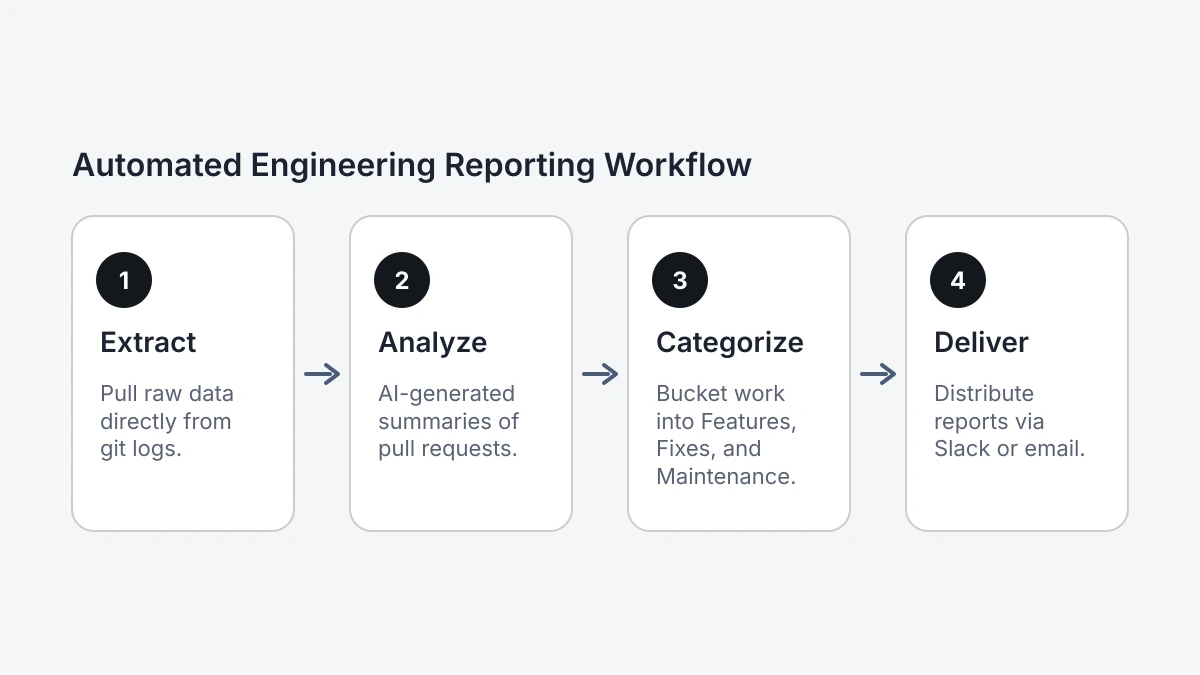
Use tools like DevSummary to analyze raw commit messages and automatically categorize them into distinct buckets: “Features,” “Fixes,” and “Maintenance.” This categorization relies on natural language processing to understand the intent behind code changes, even when commit messages are brief or technical. For a weekly cadence, this template provides a consistent structure that highlights new value delivered to customers, critical bugs resolved, and the necessary technical debt addressed to keep the platform stable. This automated sorting allows engineering managers to review and approve a draft in minutes, ensuring that the report is ready for distribution by the end of the sprint.
Integrate the summary tool with the existing version control system to implement an automated report template. Once connected, the system scans the repository for new activity within a specified timeframe. It maps specific code changes to the relevant categories, providing a narrative that non-technical stakeholders can easily digest. Developers who prefer to maintain their workflow within the terminal can Generate a git commit report from the command line to preview how their contributions will appear in the final engineering report. This visibility encourages better commit hygiene across the entire organization, as the automation rewards clear and descriptive messaging at the point of code submission.
Rely on this automated template to gain immediate clarity on resource allocation. If the “Maintenance” section consistently outweighs “Features,” leadership can identify the trend early and adjust the roadmap accordingly. While DevSummary and similar tools offer various subscription tiers to handle different repository volumes, users should confirm specific plan details and current pricing on the vendor’s official site, as these service parameters change over time. Deploying an AI-driven engineering report ensures that the documentation process is as efficient as the software development lifecycle itself, turning raw data into actionable insights for every stakeholder involved.
The Local-First Privacy Template Secures Sensitive Source Code
Adopt local-first templates to process data on developer machines and prevent proprietary logic from crossing the firewall. This approach stops engineering teams from inadvertently exposing intellectual property when piping commit histories into cloud-based summarization tools. While automated release notes save time, standard SaaS models require broad read access to private repositories, which creates a permanent digital footprint of sensitive source code on external servers. Local processing removes this risk during the drafting phase.
Maintain total data sovereignty while using modern LLM capabilities by moving to a desktop-based workflow. Use a template that runs locally so engineers can provide their own API keys from providers like OpenAI or Anthropic. This configuration ensures that data is processed according to specific privacy agreements with those providers instead of through a middleman’s infrastructure. This setup prevents public models from training on private codebases and gives security officers granular control over company data transmission.
Integrate the template with a local CLI or desktop application rather than a browser-based dashboard. This method is critical as regulatory scrutiny over data residency increases across the software industry. For a practical implementation, teams can use DevSummary Desktop: local-first engineering reports, source available, which provides the necessary framework to generate summaries without uploading raw logs to a third-party cloud. This framework allows for the rapid production of stakeholder-ready documents while keeping the underlying source code strictly under the organization’s control.
The Customer-Facing Patch Note Template Humanizes the Product
Prioritize accessible language and brand voice over internal technical jargon when using a customer-facing patch note template. Use user-centric descriptions instead of technical logs. For instance, write “Fixed a crash that occurred during the login process” instead of “Resolved NullPointerException in auth.js.” This shift ensures that the average user understands the value of the update without needing a technical background. Maintaining a consistent brand personality throughout these notes helps bridge the gap between the development team and the end-user, transforming a dry list of fixes into a narrative of continuous improvement.
Include a dedicated “Thank You” section for specific contributors or community members to drive user engagement. When a template lists the username or handle of the person who first reported a bug, it validates the effort the community puts into feedback. This recognition signals that the company listens and acts on user input, which encourages more detailed bug reports in the future. By crediting a community member for identifying a specific edge case, the release notes become a collaborative milestone rather than a corporate broadcast.
Structure the template by starting with a brief summary of the patch’s focus, followed by a bulleted list titled “What We Fixed.” Each bullet point must describe the previous issue and the current resolution in plain English. Reserve the final block of the document for contributor credits and a general note of gratitude to the user base. For teams looking to automate this process, various changelog tools offer templates that pull directly from labeled issue trackers. Check the vendor’s current pricing page to confirm feature availability and cost for community-tracking modules.
The Data-Driven Template Tracks Per-Author Contributions
Integrate a data table at the top of the internal release notes document template that categorizes work by commit type. List the total count of features, bug fixes, and technical debt items addressed during the sprint. Use this visualization of the ratio of maintenance to new development to identify if the team is spending too much time on legacy code or if the current release is heavily skewed toward feature expansion. This high-level summary provides immediate context for management before stakeholders examine specific ticket descriptions.
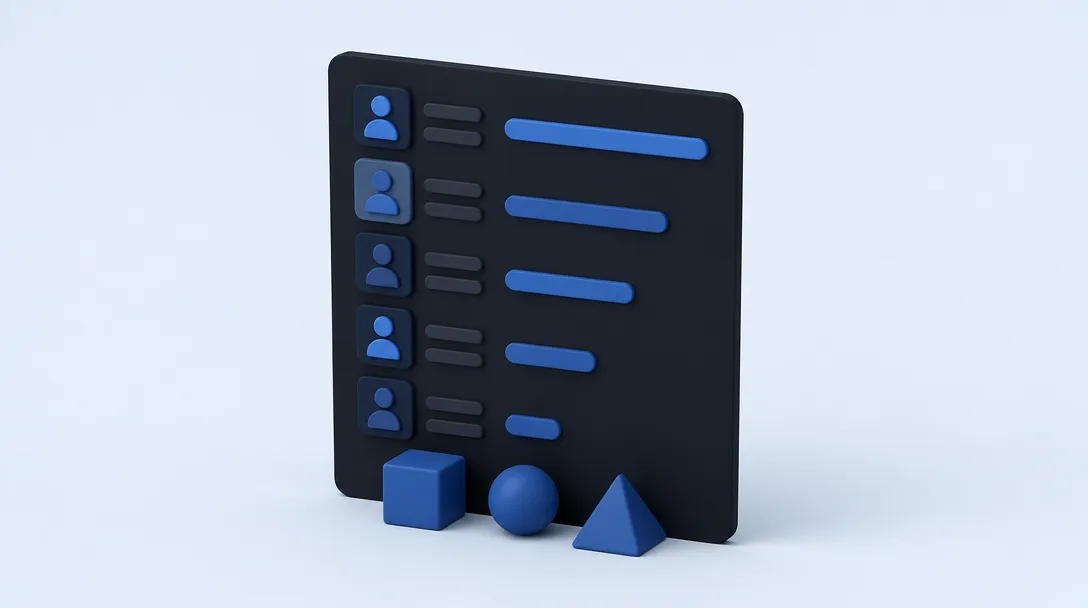
Include a specific section for per-author contributions to track individual and sub-team output. This tally should list each contributor alongside the number of merged pull requests or closed issues attributed to them within the release cycle. For managers, this creates a transparent record of team velocity without requiring a manual audit of the version control system. It highlights which developers are driving specific modules, allowing leads to spot potential silos or bottlenecks where knowledge is concentrated in a single person.
Use these metrics to adjust resource allocation for the upcoming sprint. If the data shows a spike in bug fixes compared to previous 2026 releases, increase the quality assurance focus or temporarily pause new features. For leaders seeking to refine their reporting workflows and internal documentation strategies, the Blog offers deeper insights into technical management practices. Tracking these figures directly within the release notes ensures that the document serves as both a communication tool for users and a diagnostic report for internal leadership.
Frequently asked questions
What should be included in a release notes document template?
A standard template must include the version number, release date, a categorized summary of changes, and specific impact analysis for the user. It should clearly distinguish between new features, bug fixes, and deprecated items to help readers prioritize what to review. Including a “Required Actions” section ensures that downstream users know exactly how to handle breaking changes.
How do you write release notes for non-technical stakeholders?
Focus on the business value and the “why” behind the update rather than the underlying code changes. Use an executive summary format that translates technical refactoring or backend optimizations into tangible improvements like increased system stability or faster page load times. This approach helps non-coding founders and investors understand the return on engineering investment.
Can I automate release notes from GitHub commit messages?
You can automate this process by using GitHub Actions or tools like semantic-release to pull data from standardized commit headers. This requires your team to follow a strict naming convention, such as Conventional Commits, so the script can accurately categorize entries into “Features” or “Fixes.” Automation reduces manual triage time and ensures the internal engineering report is always current.
What is the difference between a changelog and release notes?
A changelog is a raw, chronological list of every technical modification made to the codebase, while release notes are curated summaries designed for specific audiences. While the changelog serves as a developer’s audit trail, the release notes document template focuses on the impact of those changes. Use release notes to explain the significance of the work to customers and stakeholders.
How often should engineering teams publish release updates?
Publish a release update every time code is deployed to the production environment, regardless of whether your cycle is daily or bi-weekly. Maintaining this cadence ensures that internal stakeholders are prepared for operational changes and that customers feel the product is actively supported. Consistent communication prevents the accumulation of “stealth” changes that can lead to unexpected breaking issues.
Selecting the Right Release Notes Framework for Your Team
- Audit your primary audience to determine whether the document needs to bridge the gap for non-coding founders or provide deep technical specifications for peer reviewers.
- Evaluate update frequency to decide if your team can sustain manual patch notes or if you require an automated engineering report to handle high-velocity triage.
- Verify data privacy needs to establish if your internal security protocols mandate a local-first template that keeps sensitive source code off third-party servers.
- Measure downstream impact to identify if the current sprint contains breaking changes that demand a dedicated section for downstream developer protection and migration instructions.
- Determine performance metrics to see if your 2026 reporting goals require a data-driven template that tracks specific per-author contributions across the entire codebase.
As you refine your 2026 documentation strategy, Devsummary provides the tools to automate these templates directly from your version control history. Visit Devsummary to integrate these frameworks into your development workflow and eliminate manual writing tasks.