Learn how to connect Git to Slack for real-time updates and how DevSummary turns raw commit logs into readable executive reports.
Read ← Blog
Guide · · 13 min read
Automating Git Reports for Non-Technical Stakeholders
Learn how to transform raw git logs into readable engineering reports. Explore tools for founders and PMs to track progress without reading code.
DevSummary Team
Configure an AI-driven synthesis layer over your repository’s version control system before attempting to share progress updates with non-technical leads. This is the primary step because effective git reports rely on the quality of metadata, and standard logs are often too opaque for stakeholders to interpret. By establishing a system that parses technical changes into functional outcomes, you ensure that founders and project managers see the business value of a sprint rather than a confusing list of file diffs and merge markers.
This guide provides the specific criteria for selecting a reporting framework that balances data privacy with narrative clarity. You will determine whether your team requires a local-first desktop application to protect sensitive source code or a cloud-integrated scheduler for automated Slack updates. By following these steps, you will be able to replace manual status updates with a standardized pipeline that groups commit batches into plain-English summaries, effectively ending the reliance on manual wikis or unmaintained tracking repositories. These optimizations allow engineering leads to reclaim hours spent on status reports while providing the high-fidelity tallies required for management oversight in 2026.
Key takeaways
- Standardize commit messages early to ensure automated reports remain accurate and readable.
- Use local-first reporting tools to maintain data privacy while leveraging AI for engineering summaries.
- Shift from tracking raw commit volume to analyzing ‘shipped value’ through narrative-based reporting.
- Automate the delivery of git reports to Slack or email to reduce manual status update overhead.
Git reports translate technical commits into business value
Git reports function as the essential translation layer between a repository’s granular history and the high-level oversight required by project stakeholders. These structured summaries convert raw developer logs into accessible records of progress, allowing non-technical managers to monitor project velocity and milestone completion without interacting with the command line. Effective reporting serves as the primary mechanism for maintaining cross-functional transparency, ensuring that engineering efforts remain visible to those responsible for business outcomes.
The underlying mechanism of these reports involves the automated extraction of git metadata, including timestamps, branch merges, and commit headers. However, the utility of a report depends entirely on the clarity of the source data. When developers use shorthand or opaque commit messages such as “fix” or “update,” the extraction process produces a list of chronological events that lacks context. This creates a disconnect where the technical activity is documented, but the business value of that activity remains hidden behind cryptic terminology.
To resolve this opacity, modern reporting workflows integrate an artificial intelligence layer to interpret the intent behind code changes. By analyzing the actual diffs and file modifications rather than relying solely on human-written messages, these tools can synthesize the technical work into a narrative that stakeholders understand. This interpretive step transforms a series of isolated commits into a coherent summary of feature development, bug resolution, and architectural improvements, directly linking daily coding tasks to the broader project roadmap.
Raw logs fail stakeholders without narrative synthesis
Standard git output serves the compiler and the version control system, not the executive office. When a founder or product manager requests a status update, providing a raw stream from the git log command creates a cognitive burden rather than clarity. These logs are typically a chronological sequence of atomic changes, technical debt resolutions, and cryptic shorthand that fails to communicate the actual progress of a product roadmap. For a non-technical stakeholder, a list of three hundred commits over a sprint is often indistinguishable from noise.
The disconnect lies in the lack of context. A commit message like “Refactor state management in billing module” describes an action but omits the outcome. To a product manager, this does not signal whether the billing system is now more stable, ready for a new payment gateway, or if the task is merely 10% complete. Raw logs require a developer to act as a translator, manually explaining the significance of each entry. This manual synthesis is a recurring time sink that pulls senior engineers away from high-value coding tasks to satisfy reporting requirements.
DevSummary addresses this information gap by automatically grouping disparate commit batches into cohesive, plain-English narratives. Instead of presenting a fragmented list of file changes, the tool identifies related activities and synthesizes them into a readable summary that highlights business value. This allows technical teams to Generate a git commit report from the command line that stakeholders can actually use to make informed decisions without needing to understand the underlying repository structure.
By 2026, the expectation for engineering transparency has shifted toward immediate, legible documentation. Narrative synthesis transforms the “what” of a code change into the “why” of a business milestone. When developers use automated tools to bridge the gap between technical execution and stakeholder comprehension, they eliminate the friction of constant status meetings. The result is a reporting loop that respects the developer’s time while giving the founder the high-level oversight required to steer the company.
Local-first reporting protects sensitive source code
Engineering leads must balance the need for stakeholder visibility with the mandate for data sovereignty. Traditional cloud-based reporting tools often require broad read permissions for private repositories. This creates a secondary surface for potential data leaks. Move reporting logic to the local machine to ensure that sensitive commit messages, file structures, and proprietary logic never leave the internal network. This shift eliminates the risk of third-party breaches compromising the primary intellectual property of the organization.
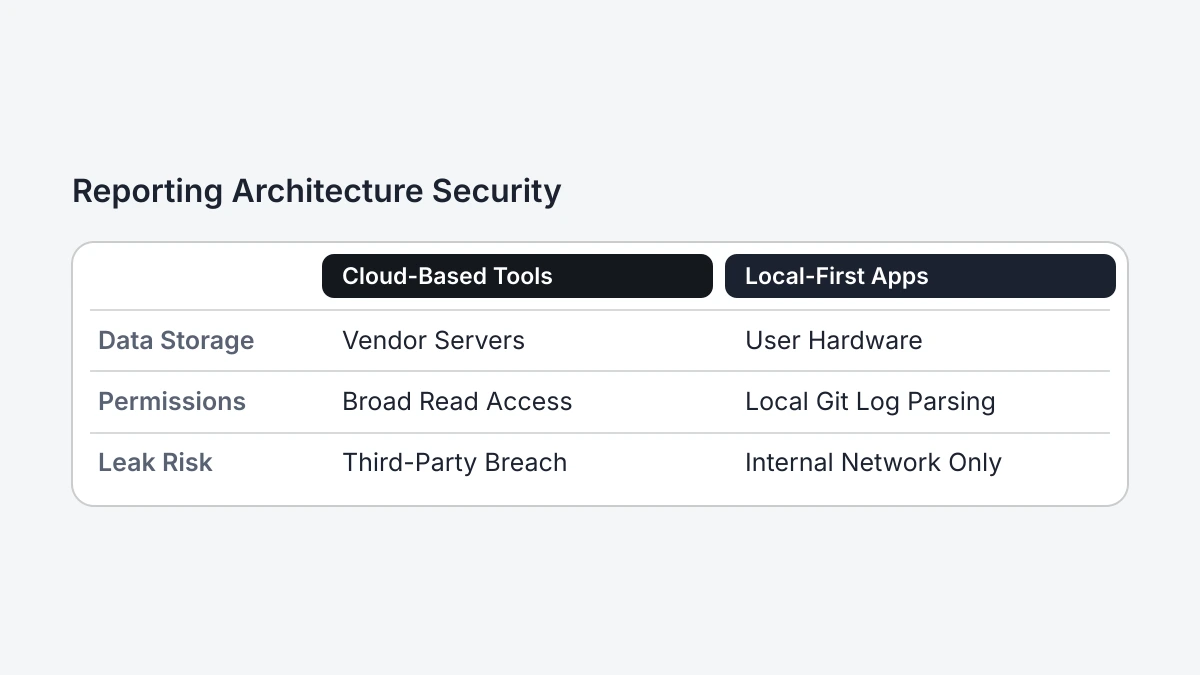
Use a local-first desktop application to remove the requirement for external data storage or centralized cloud accounts. These tools parse the Git log and metadata directly on the user’s hardware instead of syncing repository data to a vendor’s server. This architecture satisfies strict internal security audits because the data processing remains behind the corporate firewall. For teams working in regulated industries, this approach bypasses the lengthy procurement and security review cycles typically associated with SaaS platforms that ingest source code or metadata.
Manage integration through personal access tokens and local coding agents rather than global OAuth permissions. Provide your own API keys for services like GitHub, GitLab, or Bitbucket. The local application uses these keys to fetch pull request data or issue statuses over an encrypted connection. For deeper analysis, DevSummary Desktop: local-first engineering reports, source available demonstrates how local agents can synthesize this data into readable summaries without transmitting raw code to an external AI provider. This ensures that the intelligence layer operates within the same security context as the developer’s IDE.
Maintaining this local perimeter is essential, as automated reporting has become a standard expectation for engineering management. By adopting tools that do not require a persistent cloud account, leads can generate git reports on demand while maintaining absolute control over their API usage and data footprints. This method provides the necessary transparency for non-technical stakeholders without introducing the vulnerabilities inherent in multi-tenant cloud environments. It transforms reporting from a security liability into a standardized, safe administrative task.
Manual issue tracking is an archived relic of the past
Stop relying on manual repositories or wiki-based systems to track project status. These methods create a siloed reporting environment that demands constant human intervention to remain accurate. When a team must manually update a dedicated repository just to report an issue or status change, the process becomes a bottleneck rather than a bridge. Stakeholders lose visibility the moment a developer forgets to mirror a local change to the reporting repo, leading to a permanent drift between the actual codebase and the reported status.
The history of the Kudu engine illustrates the fragility of these manual methods. For a time, the project suggested a specific workflow for reporting issues via a git repository, but such manual overhead is rarely sustainable in the long term. Consequently, this repository was archived by the owner on September 4, 2024. This transition from an active tool to an archived relic highlights how quickly manual reporting systems become unmaintained when they exist outside the primary development flow. Relying on “reporting-only” repositories is a documented path toward data obsolescence and stakeholder confusion.
Replace these manual workflows with automated scheduling that extracts data directly from active branches. Instead of asking developers to duplicate their work in a tracking repo, modern git reports pull commit metadata, pull request statuses, and branch activity into a format digestible for non-technical stakeholders. This ensures that the report is always a reflection of the current state of the software, not a curated and potentially outdated manual entry. Automation removes the risk of a reporting tool being archived due to neglect, as the data generation is tied to the movement of the code itself.
Choose tools based on author tallies and commit types
Select a git reporting tool based on whether you need to audit output or communicate progress. Use the Git CLI or basic shell scripts if your management team requires per-author tallies, including commit counts, lines changed, or file frequency. These tools extract raw metadata directly from the repository. However, these metrics often fail to convey value to non-technical stakeholders who prioritize the “why” over the “how much.” Shift from raw tallies to high-level narratives explaining feature completion and business impact when the primary audience consists of founders or clients.
Evaluate the technical complexity of the setup to ensure the long-term viability of the reporting process. Standard Git commands like git shortlog provide immediate, no-cost tallies of contributions by author but require manual execution and lack context. Automate the extraction and formatting of these logs into CSV or JSON files for spreadsheet analysis using legacy scripts written in Python or Bash. While this satisfies internal resource planning, it leaves the burden of interpretation on the reader. Organizations increasingly look toward automated solutions that bridge the gap between technical commits and executive summaries.
Deploy advanced AI reporting tools to transform commit messages and pull request descriptions into readable status updates. These tools analyze the intent behind code changes rather than just the volume of the delta. For leaders who need to understand product velocity without reading diffs, DevSummary: GitHub Reporting Tool for Founders provides a structured way to generate these narratives. Choose between these tiers by weighing the need for granular developer metrics against the need for clear, stakeholder-ready communication.
| Feature | Git CLI | Legacy Scripts | AI Reporting (DevSummary) |
|---|---|---|---|
| Primary Output | Raw commit logs | Formatted tables/CSV | Narrative summaries |
| Stakeholder Value | Low (Technical only) | Moderate (Audit trails) | High (Business context) |
| Setup Effort | None | High (Custom coding) | Low (API connection) |
| Analysis Type | Quantitative tallies | Aggregated metrics | Qualitative synthesis |
Automated scheduling removes the status update bottleneck
Connect GitHub to your reporting tools using Personal Access Tokens (PAT) or GitHub Apps to provide read-only access to repository metadata. Once authenticated, these tools poll the GitHub API to collect data on pull requests, commits, and issue resolutions for specific dates. Most platforms include options to set a recurring schedule, such as a weekly cadence, to trigger data collection automatically. This configuration pulls activity directly from the repository, which prevents the mistakes or missing information common in manual entry.
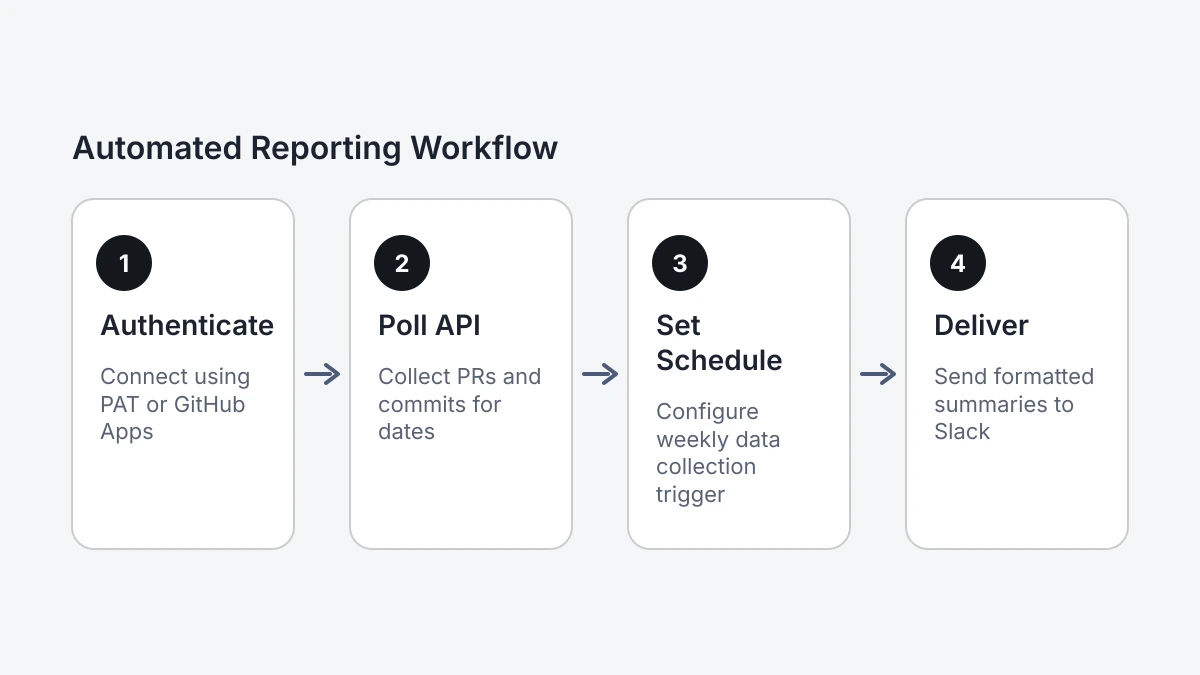
Convert raw repository data into formatted summaries for Slack or email. Configure a webhook or SMTP integration to deliver these git reports to the channels your stakeholders already use. You can send a weekly GitHub digest to Slack using native integrations, third-party connectors, or custom scripts. These automated updates create a regular reporting rhythm. This allows managers to track progress without learning how to use version control interfaces.
Automate this cycle to save the hours engineering leads usually spend every Friday or Monday writing status reports. Instead of searching through branch histories and tickets to prove team velocity, leads can spend that time explaining what the data means for the project. Moving from manual compilation to automated oversight makes reporting a standard part of the workflow rather than a separate chore. By using a scheduled service to handle the retrieval and distribution of git reports, engineering leads have more time for technical mentorship and architectural planning.
Standardized contribution reporting requires consistent metadata
Standardized reporting tools often fail when a team lacks a rigid commit convention. These systems typically expect every contribution to follow a specific syntax, such as Conventional Commits, to categorize work automatically. If developers use varied date formats or idiosyncratic message structures, the resulting git reports often fail to aggregate data correctly. This creates a “low-fidelity” reporting environment where the raw output is too fragmented for a non-technical stakeholder to understand without heavy manual editing.
To overcome these inconsistencies, an automation tool must be capable of interpreting messy logs rather than just rejecting them. Many open-source utilities rely on specific input parameters to function; for instance, the gitreport tool documentation demonstrates usage with a strict ISO-style date like 2019-11-01. When a team’s local environment or git configuration deviates from these expected standards, the automation script may return empty sets or errors. A resilient reporting strategy requires a tool that can normalize diverse metadata into a readable format, bridging the gap between developer habits and stakeholder requirements.
Engineering leads should evaluate whether their current workflow supports a rigid tool or if they require a more flexible aggregator. If the team is currently in a low-fidelity state, selecting platforms that prioritize data cleaning and pattern matching is essential for long-term automation. For a broader look at available options, managers can review the 6 Best GitHub Reporting Tools in 2026 (Free & Paid), Compared to find a solution that fits their specific level of metadata discipline. Choosing a tool that handles non-standardized logs ensures that the automation remains reliable even as team members and commit habits change.
Frequently asked questions
How do I generate a git report from a specific branch?
Execute the git log [branch-name] command or select the target branch within your reporting tool’s filter settings to isolate specific development streams. This focus prevents main-line updates from cluttering the report, allowing you to track progress on individual features. Use the --no-merges flag to further refine the output by highlighting direct contributions rather than integration overhead.
What is the best git reporting tool for non-technical founders?
The most effective tools for founders are those that prioritize narrative synthesis and “impact” metrics over raw line counts, such as GitClear or Waydev. These platforms translate technical churn into business progress, making them ideal for stakeholders who need to understand velocity without reading code. The best options leverage LLMs to automatically categorize commits into strategic objectives.
Can I automate weekly engineering reports from GitHub activity?
You can automate these reports by configuring GitHub Actions to run a reporting script or third-party integration on a weekly cron schedule. This workflow extracts recent activity and pushes a formatted summary directly to Slack or email, removing the status update bottleneck. It ensures stakeholders receive consistent visibility into engineering output without requiring any manual intervention from the team.
How do I protect source code privacy when using AI git reporting?
Protect your privacy by utilizing local-first reporting tools that process data on your own infrastructure rather than uploading source code to third-party servers. If you opt for cloud-based AI, verify that the provider offers an enterprise agreement that explicitly excludes your repository from their model training sets. Restricting the tool’s access to commit metadata rather than full file contents provides an additional security layer.
Choosing Between Manual Synthesis and Automated Git Reports
- Audit data sensitivity. Establish whether your organizational security policy permits sending source code metadata to third-party cloud processors or requires a strictly local execution environment to stay compliant.
- Quantify author volume. Calculate the total number of active contributors across your repositories to ensure the selected reporting tooling supports your specific team scale without performance or licensing constraints.
- Review commit standards. Verify if your engineering team currently uses standardized prefixes or Conventional Commits to enable the automated sorting of technical tasks into readable business-facing categories.
- Identify stakeholder priorities. Determine if your non-technical audience requires high-level narrative summaries of feature delivery or granular data regarding bug resolution and technical debt.
- Set update cadences. Decide if the reporting engine should trigger automatically upon every pull request merge or deliver a synthesized digest on a fixed daily or weekly schedule.
To simplify the production of git reports, Devsummary offers a local-first solution that transforms raw repository data into professional, stakeholder-ready documentation. Visit https://devsummary.com/ to automate your status updates.
More posts
Guide · · 13 min read
Mastering Git Slack Integration for Engineering Visibility
Guide · · 13 min read
Choosing Project Management Agile Software in 2026
A guide to selecting agile software for non-technical leaders, featuring 10 top tools and strategies for translating dev activity into business value.
Read